Choosing a Shock Template: Shocked Cat, Confused Doge or Panda Head
In group chats and social commentary, we constantly express surprise—but slap on the wrong meme face, and the emotional tone shifts entirely. Picking the right reaction template comes down to understanding your true intent: are you genuinely floored, politely puzzled, or seizing a chance to be sarcastic?
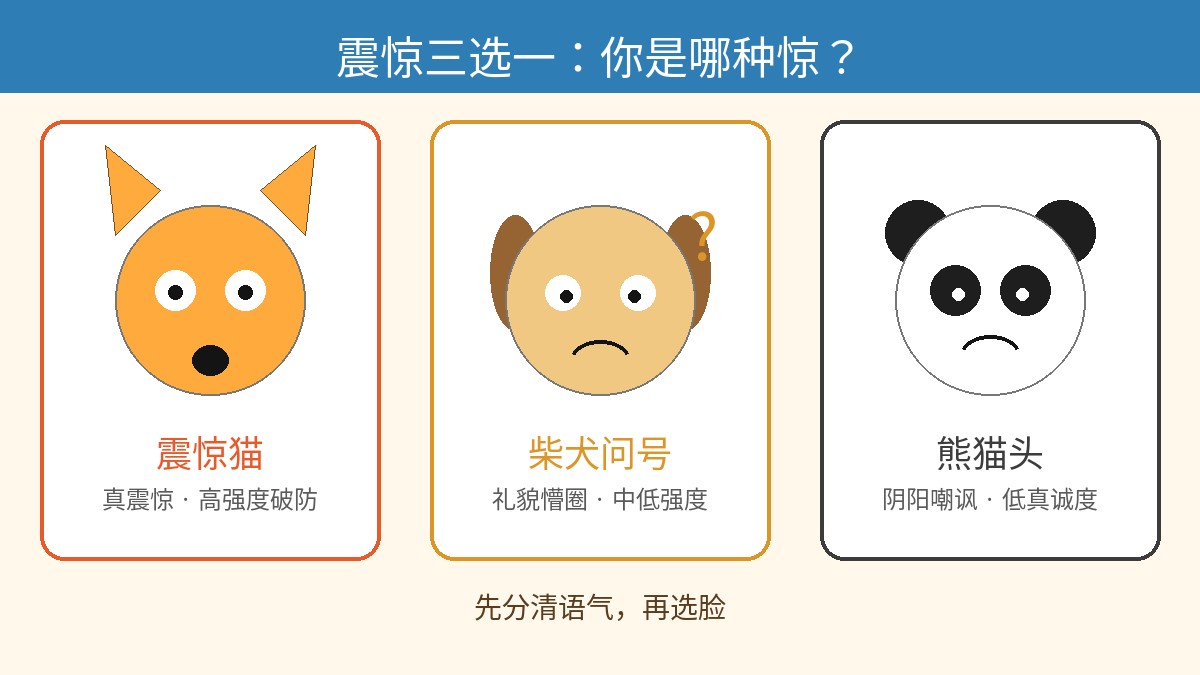
This guide breaks down three classic surprise templates—Shocked Cat, Confused Doge, and Panda Head—analyzing their emotional intensity, subtle nuances in tone, and offering a quick step-by-step workflow to generate them in the editor.
Emotional Intensity: Are You Genuinely Stunned or Just Trolling?
You can generally rank the emotional intensity and intent of these three templates as follows:
Shocked Cat (High-intensity meltdown) > Confused Doge (Low-to-medium bewilderment) / Panda Head (Special variant: Low sincerity, high passive-aggression/sarcasm)
- Shocked Cat: Delivers visceral, biological shock. Dilated pupils or a dropped jaw communicate an unguarded, jaw-dropping jolt. - Confused Doge: Captures a cognitive disconnect. A tilted head and questioning eyes convey practically zero aggression—your brain just short-circuited, but you remain completely polite. - Panda Head: Built for social friction and dry mockery. Combining minimalist monochrome sketch lines with uncanny human facial expressions, it's rarely about how surprising the news is—it's about mocking the person who said it.
Tone Breakdown and Classic Use Cases
1. Shocked Cat: Raw Shock, Pupil Quake, Genuine Meltdown
- Core Tone: Disbelief, world-shaking surprise, pure bewilderment.
- Best For: Breaking news, outrageous bills, sudden deadline shifts, explosive gossip.
- Caption Example:
- Top Text:
WHAT?! - Bottom Text:
DUE TOMORROW AT 8 AM?! - Meme Logic: Keep rhetoric minimal. Short phrasing and packed punctuation marks amplify that frozen-in-place, heart-skipping-a-beat reaction.
2. Confused Doge: Polite Puzzlement, Helpless Innocence, "Say That Again?"
- Core Tone: Harmless, out of the loop, gingerly asking for clarification.
- Best For: Contradictory client requests, overly convoluted inside jokes, deciphering bizarre instructions.
- Caption Example:
- Top Text:
Wait... - Bottom Text:
What does "colorful black" even look like? - Meme Logic: Animal innocence diffuses tension. It carries no malice, making it a great conversational cushion in workplace Slack channels or friendly chats.
3. Panda Head: Passive-Aggressive, Deadpan Smirk, Maximum Sarcasm
- Core Tone: Dismissive, "are you kidding me?", faux-polite contempt.
- Best For: Calling out nonsense, reacting to obvious bad takes, asking questions when you already know the absurd answer.
- Caption Example:
- Top Text:
Thanks for that explanation - Bottom Text:
I just lost 10 minutes of my life - Meme Logic: Panda Head's human expressions usually feature a forced smile, squint, or sneer. Paired with a calm question, the dry sting hits with maximum impact.
Same Caption, Different Template: Side-by-Side Comparison
Take a single caption to see how the visual vessel completely rewrites the subtext:
Universal Caption (Example):
Top:This plan...
Bottom:Are you serious?
- With Shocked Cat: The subtext is "Oh my god, how could this possibly pass? This is madness!"—focused on the sheer disbelief of the situation, often with genuine panic or shared empathy. - With Confused Doge: The subtext is "I might have missed something... did I skip a slide?"—focused on mild self-doubt and polite clarification without ruffling feathers. - With Panda Head: The subtext is "You showed up to the meeting with this trash?"—focused directly on questioning the other person's competence, loaded with biting sarcasm.
Step-by-Step: How to Generate Memes Fast in the Editor
Once you’ve settled on the tone, follow these steps to build your meme quickly:
- Pick the Base Image: Search for "Shocked Cat", "Question Mark Doge", or "Panda Head" in the template library, or upload your own clean image without text.
- Enter Your Captions: Use the Top Text and Bottom Text input fields. Keep both lines concise and punchy so long text wraps don't crowd the visual frame.
- Apply the Classic Style:
- Enable the classic text outline (typically white text with a black stroke, or black text with a white stroke) to ensure high legibility over dark or cluttered backgrounds. - Adjust the font size according to available negative space, and center-align the text.
- Adjust Placement & Margins: Drag or nudge the text boxes up or down to ensure the words never obscure the character's facial expression—especially the eyes and mouth.
- Export Format: Most messaging apps handle static PNG images effortlessly. Export a medium-to-high resolution PNG, save it, and send it away.
Want to see how your caption lands across these three expressions? Head over to meme.rapporteur.online to tweak and test them live.
Open the meme maker
Choose a template or upload your own image, add top and bottom text, and export a crisp PNG. Your image is processed in your browser.