How to Keep Memes Sharp on WeChat: Size, Format and File Weight
Many memes look crisp and sharp when designed on a phone or computer, but once added to WeChat custom stickers or sent into a chat bubble, the text edges grow jagged artifacts, and the whole image turns blurry and washed out.
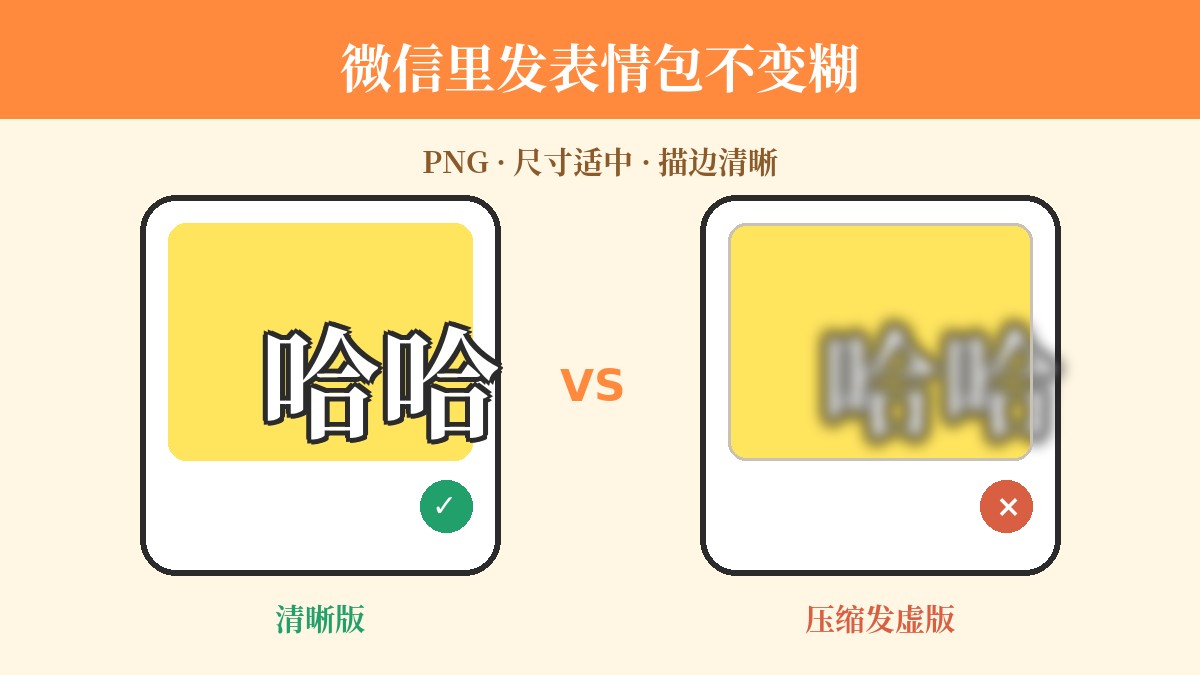
The root cause of blurry memes lies in platform transmission and compression mechanisms. Understanding the trade-offs between dimensions, format, and file size allows you to produce clean, sharp memes that withstand WeChat's display environment.
Why Do Memes Get Blurry When Sent on WeChat?
WeChat enforces strict bandwidth and rendering controls on chat images and custom stickers. This compression typically happens across two dimensions:
- Resolution downscaling: If the original uploaded image has an excessively high resolution, the platform automatically scales it down proportionally to standard dimensions tailored for mobile chat bubbles.
- File size compression and transcoding: When file weight exceeds certain thresholds, the platform applies a secondary lossy compression.
When a meme file is oversized and forcefully compressed, the degradation rarely manifests as darker colors; instead, you get fuzzy text edges, pixelated compression artifacts (ringing/haloing), and color banding across flat backgrounds. Therefore, making great memes isn't about chasing 4K ultra-high resolution—it's about achieving moderate dimensions, lean file weight, and crisp edges.
Note: Custom sticker file limits and pixel constraints vary slightly across different WeChat client versions. Standard practice is to keep file weight within reasonable bounds; please refer to WeChat's latest official guidelines for exact specifications.
PNG vs. JPG: Format Trade-offs for Text-Based Memes
When creating memes, your choice of image format directly determines text legibility:
- JPG (Lossy compression): Ideal for photographic scenes with rich colors and smooth gradients. However, JPG algorithms struggle with high-contrast, hard edges (such as white text with black outlines), easily generating persistent noise and ringing artifacts around letters. Following WeChat's secondary compression, the text quickly turns into an unreadable smear.
- PNG (Lossless Compression): Fully preserves the edge details of every pixel, making it ideal for memes with large text, flat color blocks, or simple line art.
The lifeblood of any meme lies in its caption. The fundamental visual rule is: prioritize crisp text edges first, then worry about background details. Whenever an image contains text, PNG format should generally be your first choice for export.
Avoiding the Compression Trap: Step-by-Step Guide to Blur-Free Memes
Using lightweight online tools, follow these steps to create a meme that stays sharp and resists compression:
Step 1: Prepare the Base Image and Adjust the Framing
Choose a classic built-in template or upload your own image in the editor.
- Opt for base images with minimal noise and a clear focal point.
- If there is excessive empty space around the subject, use the canvas's zoom and drag controls to enlarge and center the facial expression or action, reducing wasted pixels that unnecessarily bloat file size.
Step 2: Keep the Text Punchy and Plan Your Layout
Enter your Top Text or Bottom Text. Less is more when it comes to meme text—the more words you have, the smaller the font size, and the harder it becomes to read after compression.
- Adjust the font size so the text spans roughly 70% to 85% of the frame horizontally (adjust flexibly based on your composition).
- Set text alignment (center, left, or right) based on where the subject sits, ensuring it never obstructs key facial expressions or gestures.
Step 3: Enable the Classic Text Outline
This is the single most effective step against WeChat compression.
- Turn on the classic outline style for your text (typically white text with a black outline, or black text with a white outline).
- An outline creates a physical buffer between the letters and busy backgrounds. Even if WeChat slightly degrades the image quality, the high-contrast outline clearly defines each stroke, preventing letters from blurring together.
Step 4: Export as PNG
Once you're satisfied with your edits, click download to export in PNG format. This locks in sharp text edges and prevents pre-compression quality loss right at the saving stage.
Practical Tips for Adding to WeChat
Once created, there are two common ways to use your meme after sending it to your phone:
- Send directly as an image: Best for larger dimensions or text-heavy graphic memes.
- Add to WeChat "Stickers" (Custom Stickers): Best for square, compact classic memes. Simply long-press the image in the chat interface and select "Add to Stickers". If you get a "file too large" warning, it usually means the original base image resolution was too high—simply head back to the tool, scale down the size slightly, and re-export.
While platform rules will always evolve, the core strategy of "controlling file size, prioritizing PNG, and reinforcing outlines" remains universal.
To quickly craft sharp, clean, compression-resistant memes, try it out directly at meme.rapporteur.online.
Open the meme maker
Choose a template or upload your own image, add top and bottom text, and export a crisp PNG. Your image is processed in your browser.