Success Baby Energy: Caption Formulas for Small Wins
In online meme culture, "Success Kid" — the photo of a toddler on a beach clenching a small fist with a determined look — is one of the most classic memes. Rather than grand promotions or life turnarounds, people use it mostly to amplify tiny, quietly satisfying moments in everyday life.
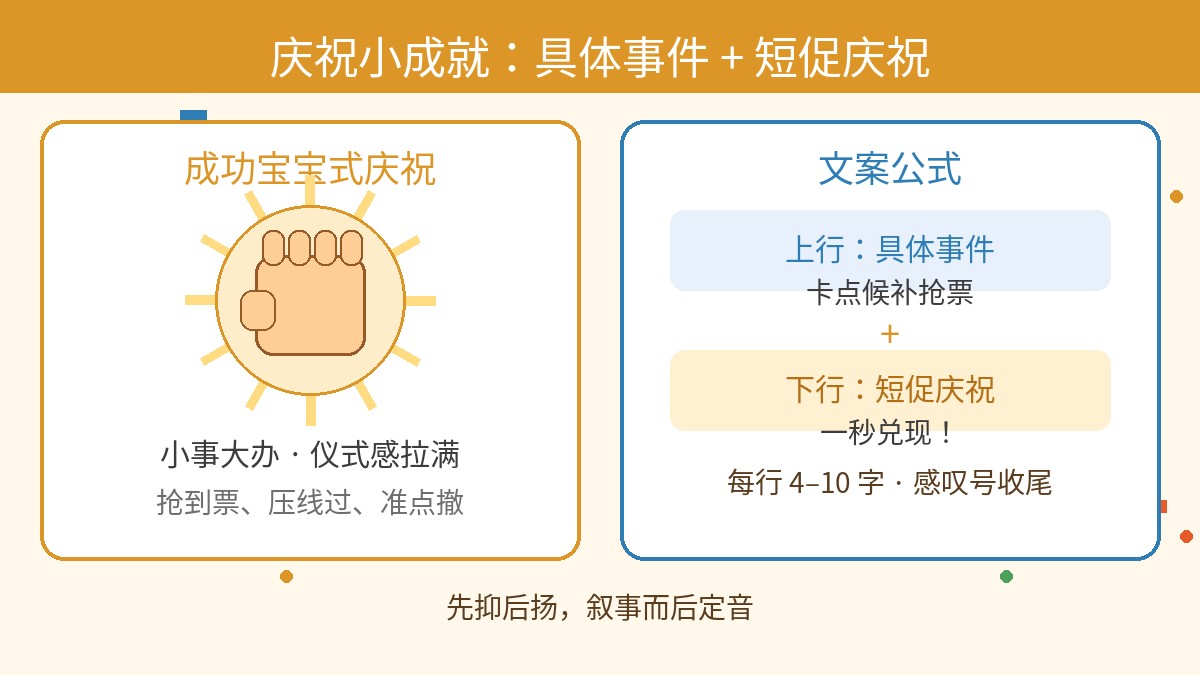
This article breaks down the psychology behind this kind of meme, distils caption formulas you can use as-is, compares it with red celebration-poster templates so you can choose between them, and finally shows how to make one quickly in a web editor.
Why Make a Meme for a Small Win?
Psychology often talks about micro-habits and positive feedback: when a tiny thing gets done, an immediate, clear emotional confirmation can genuinely release pressure.
That is exactly why Success Kid has lasted so long — it creates contrast and ceremony. It uses the most determined, most triumphant expression to celebrate something that looks trivial to others but feels extremely satisfying in the moment. This kind of self-celebration needs to prove nothing to anyone, yet it readily sparks emotional resonance in a group chat or a feed.
The Core Caption Formula: Specific Event + Short Celebration
To make a Success Kid meme land, keep it short — no long essays. The classic format is two lines:
Caption formula
Top line (setup): a specific event (including the obstacle, the luck involved, or a small everyday hassle)
Bottom line (payoff): one short, confident celebratory phrase
The rhythm between the two lines should be "hold back, then land it" — tell the story first, then deliver the verdict. Each line is usually 4–10 Chinese characters (or a similarly short phrase in English); the faster it reads, the harder it hits.
Here are a few common scenarios (all sample captions, for reference only):
- Scenario 1: Grabbing tickets / racing the clock
- Top line (example): Waitlisted ticket, grabbed at the last second
- Bottom line (example): Secured in one second!
- Scenario 2: Clocking off / end of the workday
- Top line (example): Friday, 6:01 p.m.
- Bottom line (example): Clocked out right on time!
- Scenario 3: Exams / certificates / clearing a task
- Top line (example): Crammed everything at the last minute
- Bottom line (example): Just scraped through — and still passed!
- Scenario 4: Everyday trifles
- Top line (example): Instant noodles, and nothing boiled over
- Bottom line (example): Perfect water control!
The key is that the second half must be short and punchy, usually ending with an exclamation mark, so the feeling of "got it in the bag" comes through at full strength.
Advanced Play: Success Kid vs. Red Celebration-Poster Templates
When celebrating good news, besides the blue-sky-and-beach Success Kid, many people wonder whether to use a "big red celebration poster" style template instead. The two differ clearly in tone and in the emotion they carry:
| Dimension | Success Kid template | Red celebration-poster template |
|---|---|---|
| Emotional tone | Private satisfaction, self-deprecating humour, small luck | Warm and festive, announced to the world, formal proclamation |
| Caption focus | The coincidence of the process and the relief of the moment | The certainty of the result and the highlight moment |
| Typical scenarios | Missed the 8 a.m. class but the teacher was late too; grabbed the last takeaway order | Passed an important exam, graduated, a whole project wrapped up |
| Where the joke comes from | Making a big deal of a small thing (a grand expression for a tiny win) | The playful clash between formal ceremony and a makeshift reality |
If your win is a private, tongue-in-cheek "lucky escape", Success Kid has more meme sensibility. If you are broadcasting a milestone to family or a relatives-and-friends group, or deliberately want a retro, drums-and-gongs contrast, a big red template fits better.
Hands-On Tutorial: Make Your Own Success Meme in the Editor
In the editor at meme.rapporteur.online, you can recreate this classic layout with no learning curve. The steps are:
Step 1: Pick a Template or Upload an Image
Open the editor's main screen, find the Success Kid template in the preset template library and select it. If you have snapped a photo of your own pet or a friend with the same "fist-pump victory" look, you can also upload a local image directly as the base picture.
Step 2: Add the Top and Bottom Lines
In the text editing area, enter the caption from the formula above:
- First line (top text): your specific event;
- Second line (bottom text): your short celebratory phrase.
Step 3: Apply the Classic Outlined Style
So the text stays legible over sand, clothing and busy backgrounds, use the classic white text with a black outline (or black text with a white outline) in a bold outlined style. The high-contrast edge keeps the words readable even as a thumbnail.
Step 4: Adjust Size, Font and Centre Alignment
- Set both lines to centred alignment;
- Choose a sturdy, easy-to-read sans-serif or bold font;
- Fine-tune the sizes: the short celebratory line at the bottom is best set slightly larger than the event description on top, to strengthen the visual emphasis.
Step 5: Scale, Drag and Compose
Click on a text box on the canvas and drag it, or use the scaling handles, to adjust the text position. Keep two rules in mind:
- Position the top line snug within the upper safe zone;
- Keep the bottom line close to the bottom, and do not cover the little boy's determined little face or his clenched right fist — that is the visual heart of the picture.
Step 6: Download and Export
Once you have checked the spelling, export as PNG. That format preserves the smoothness of the text edges well, and is easy to save to a phone album or send straight to a messaging app.
Size and Format Notes
In social chat scenarios, memes generally circulate most smoothly as squares or close to a 4:3 ratio. Mainstream chat apps usually compress very large images automatically, so exporting at an ordinary, generally used resolution is enough for the details to read clearly. If you need a cover image for a specific content community, follow that community's latest official crop ratio.
If you have just squashed a tricky bug, or grabbed a ticket you have been longing for, try the formula at meme.rapporteur.online and make one for yourself — a small, well-earned ceremony.
Open the meme maker
Choose a template or upload your own image, add top and bottom text, and export a crisp PNG. Your image is processed in your browser.